Welcome to the University of York! It's great to have you here. We hope you're settling in.
There's a lot to take in in the first few weeks, so we wanted to strip things down to the essentials for this blogpost. Here's five resources to get you started:
1) An interactive map of the library. We've created a map of the Library in Prezi, which will take you on a guided tour of our three main buildings. Just click the 'Start Prezi' box below - you can either navigate through the tour using the arrows, or skip straight to a part of the library you're interested in by clicking on it.
2) YorSearch, the library catalogue. You'll be needing books, articles and other materials depending on what degree you're studying. There's a number of ways to get these, starting with the search tool YorSearch which tells you what we have in stock at the Library, as well as linking to hundreds of thousands of online resources. You can find YorSearch on special catalogue PCs around the Morrell Library, or you can go straight to yorsearch.york.ac.uk from any device, put in your keywords and see what we have.
Embedded below are some UoYTips on finding what you need and getting the most out of the system:
Finding what you need with YorSearch: #UoYTips from University of York Library
You may also be directed to resources from the VLE (Virtual Learning Environment), via Resource Lists put together by your lecturers which link out to YorSearch and other useful sources.
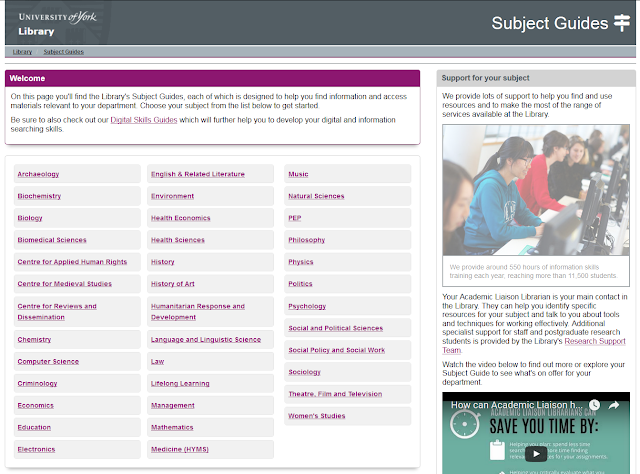
3) The Subject Guide. Every Department has a Subject Guide. It's a curated collection of information and resources for your subject. Choose your Department from this menu and see what we have that can help you study.
There are many advantages to using the resources on the Subject Guide. There are often huge collections of online journals or books which you can search all at once with keywords. All the resources are high quality academic sources, the majority of which Google won't be able to find because they're behind a paywall. And we, the Library, have paid to get you through that paywall so you don't have to - just make sure you find the journals and databases via the links on our site, so they ask you to log in with your IT username and password and you get the full access entitled to you as a student at York.
4) The YouTube channel. We have a LOT of useful videos about the Library, IT and Archives on YouTube. But we don't want you to be overwhelmed, so we've created a UoYTips playlist with 6 key videos to start off with: New students start here!
Here's the first video on the playlist, outlining what you can expect at York.
5) The New Students webpage. We've put together a little to-do list on our page aimed at new starters over on the main library website. Have you written on the walls at the top of the Fairhurst yet?
The final tip on that page is to search for more #UoYTips online. You'll find guidance and advice on the website, on Twitter, on Facebook, on Instagram, as well as YouTube and Slideshare as mentioned above. We've also created a special Subject Guide to pull together all the resources we've made - open the UoYTips Subject Guide now and take a look!
We hope you can find useful tips on just about everything, and we'd really like you to add your own across social media. If you've found something that has helped you, let your peers know about it too... Just use the hashtag #UoYTips so others can find it.
Good luck with your first term. If you need help, just ask!
You may also be directed to resources from the VLE (Virtual Learning Environment), via Resource Lists put together by your lecturers which link out to YorSearch and other useful sources.
3) The Subject Guide. Every Department has a Subject Guide. It's a curated collection of information and resources for your subject. Choose your Department from this menu and see what we have that can help you study.
There are many advantages to using the resources on the Subject Guide. There are often huge collections of online journals or books which you can search all at once with keywords. All the resources are high quality academic sources, the majority of which Google won't be able to find because they're behind a paywall. And we, the Library, have paid to get you through that paywall so you don't have to - just make sure you find the journals and databases via the links on our site, so they ask you to log in with your IT username and password and you get the full access entitled to you as a student at York.

4) The YouTube channel. We have a LOT of useful videos about the Library, IT and Archives on YouTube. But we don't want you to be overwhelmed, so we've created a UoYTips playlist with 6 key videos to start off with: New students start here!
Here's the first video on the playlist, outlining what you can expect at York.
5) The New Students webpage. We've put together a little to-do list on our page aimed at new starters over on the main library website. Have you written on the walls at the top of the Fairhurst yet?
The final tip on that page is to search for more #UoYTips online. You'll find guidance and advice on the website, on Twitter, on Facebook, on Instagram, as well as YouTube and Slideshare as mentioned above. We've also created a special Subject Guide to pull together all the resources we've made - open the UoYTips Subject Guide now and take a look!
We hope you can find useful tips on just about everything, and we'd really like you to add your own across social media. If you've found something that has helped you, let your peers know about it too... Just use the hashtag #UoYTips so others can find it.
Good luck with your first term. If you need help, just ask!


